

English
Radio Group
Radio Group is data input component that lets your members pick a single option of radio buttons group.
This component has the following settings:
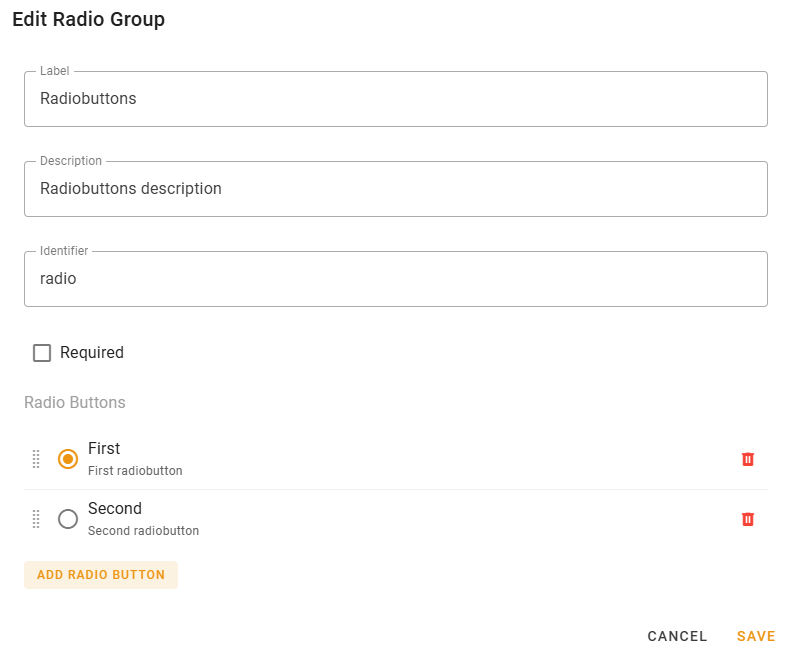
- Label — label displayed on the radio group;
- Description — description displayed on the radio group with smaller font size;
- Identifier — component identifier, enter something related to the component;
INFO
Identifier must be unique across all message components of this action.
The message template of Action being executed by this modal will get
modal.valuesvariable map, which keys will be those identifiers and their values are data entered by member.Thus, this way Action can determine what exact option has been selected.
- Required — the value will be required to fill if checked;
- Radio Buttons — the list of radio buttons in the group (from 2 up to 10).
Radio Buttons
Radio buttons have the following settings:
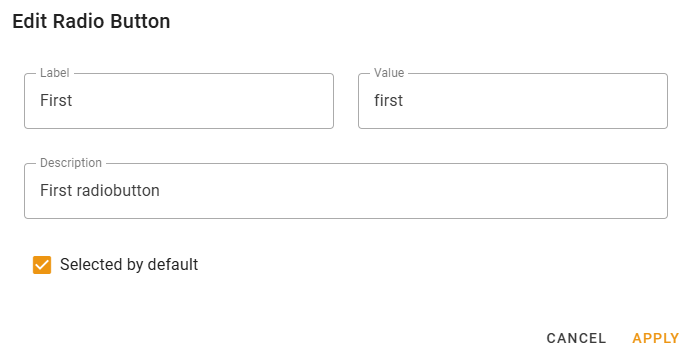
- Label — Label of the radio button;
- Value — Value of the radio button, enter something related to this option;
INFO
It must be unique across all radio buttons of this group.
This value will be passed to
modal.valuesvalue related to this component.Thus, this way Action can determine what exact option has been selected.
- Description — radio button description;
- Checked by default — checking this will make this radio button to be selected by default;
Availability
This component is only available for Modal Form actions.