

English
Actions
Actions are used to perform various operations in response to a command or component interaction.
Actions are part of Custom Commands.
Settings Interface
Each action has a certain set of general settings regardless of its type:
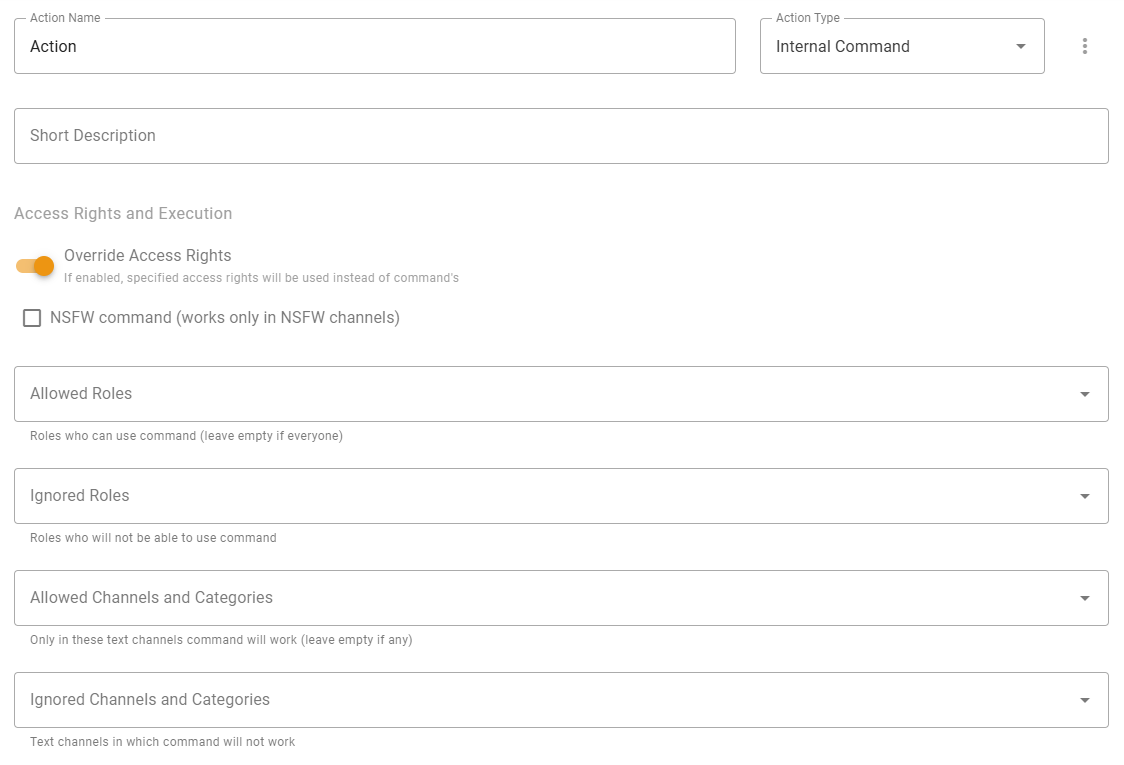
- Action Name — the name of the action displayed in its tab and action selections;
- Icon — action menu containing information about action and duplicate option;
- Action Type — type of the action. You can find detailed explanation for each of them just below in next sections within this category;
- Short description — just a short description of this action displayed in action selections;
- Override Access Rights — turning on this option will force access rights checking for this action additionally to command's access rights.
UUID
UUID — unique action identifier that can be used in Advanced Message Templates.
Action Types
- Send Message — execution of such action will send a message.
- Modal Form — execution of such action will show modal form to get some input from user with great UI.
- Change Roles — execution of such action will remove or add the roles specified in the action settings. By default, this can only be done by the member who executed this action by command or component.
- Internal Command — execution of such action will be redirected to build-in command specified in the template of this action. For example, if you create a command with the name
me, enter theuserin the action template, invocation of!mecommand will do the same thing as you would invoke!usercommand directly. - Execute Template Code — execution of such action will interpret specified template and will respond with simple success message. This action type is useful for executing another action conditionally.
Executing action by another action
If you're an advanced used able to handle advanced features of Message Templates, you can use run tag to run action from another action. More detailed information about how to do it is described here.
Parameters
Every action message template has parameters variable used to pass data between actions. For example, it's possible to pass data from Send Message action to its Message Components actions. You can also use parameters to pass data to child actions.
INFO
For more information about custom commands parameters and how to use them, check Parameters article.