

Auto-Moderation
Auto-Moderation will make your moderator's life easier helping them to monitor member messages automatically.
Filters
Filters are special triggers in moderation settings of server's dashboard responsible for certain actions:
- Links — triggers to unwanted links;
- Invites — triggers to Discord server invites;
- Scam & Phishing Links — triggers to scam and phishing links;
- Bad Words — triggers to unwanted words in messages;
- Repeated Text — triggers to specified amount of equal messages (flood) from the same member;
- Caps Lock — triggers to excessive CAPS LOCK in messages;
- Emotes — triggers to excessive amount of emotes in the single message (not reactions!);
- Mentions — triggers to excessive amount of channel and members mention in the single message;
- Zalgo — triggers to z͍͖̟a̶̠l̩̗͖̻̭g̬̦̳̤̞̟͜o̝̬̳̺̱͙͘ text in messages.
Those filters have the general settings:
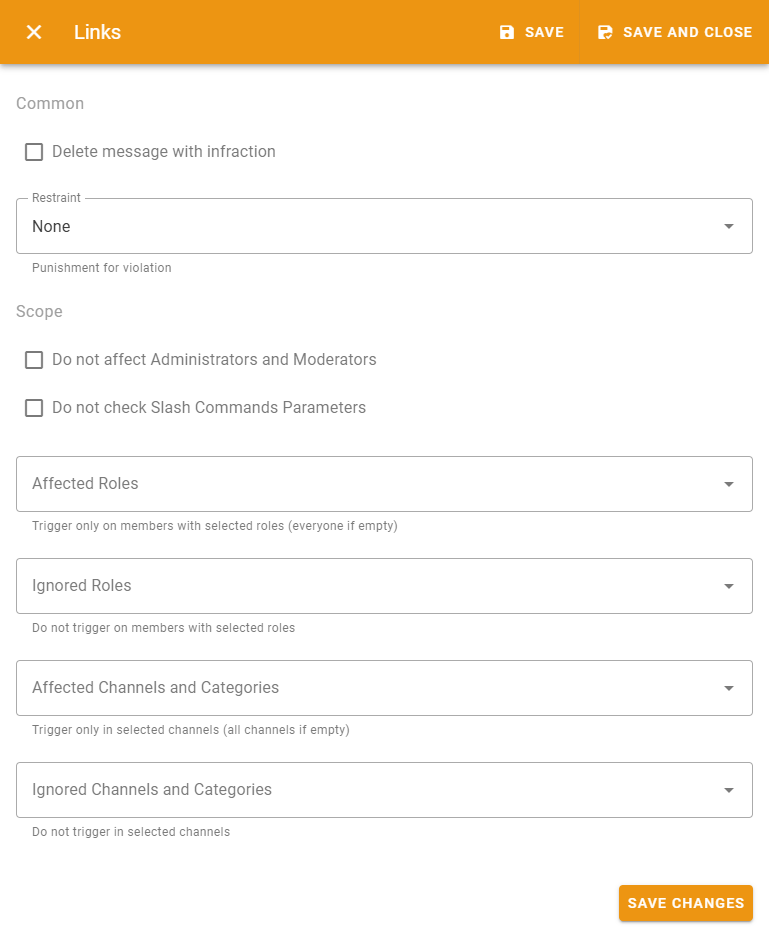
- Restraint — is the punishment action that will be applied to violator;
- Do not affect Administrators and Moderators — allows to disable this filter for server's owner, members with Administrator permission and moderator roles specified in the moderation settings of server's dashboard;
- do not check Slash Commands Parameters — allows to disable this filter from checking slash command parameters;
- Affected Roles — filter will be applied to members with specified roles. Will be applied to everyone if empty;
- Ignored Roles — filter will not trigger any actions for roles specified here;
- Affected Channels and Categories — filter will be applied only to specified text channels. Any channel if empty;
- Ignored Channels and Categories — filter will not trigger for specified text channels.
Every filter has a message template that will be sent every time it triggers.